NetBSD on the Dell Inspiron 8200
Originally written September 13th, 2026.
 This also applies to the Dell Latitude C840 and could also apply to the Inspiron 4150 and Latitude C640.
Before you begin/"Why NetBSD?"
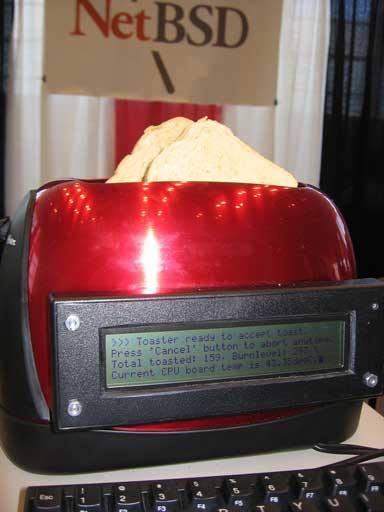
It's a well-known fact that NetBSD is an operating system that can run on just about anything. From the Macintosh IIx and the 68030 Amigas to anything from the past few years- yada yada yada yeah you get the point. It runs on the computer equivalent of a fucking toaster.
We all know why you're here. You're here to see an autistic transfem infodump about NetBSD on a 24-year-old laptop. And that's exactly what I'm gonna do. I am full of autism AND estrogen.
Joking aside, NetBSD is an amazing operating system that's basically like if you kept maintaining solid software without adding a bunch of random garbage to it, and I absolutely adore that. I am a total slut for vintage hardware running modern software, and modern hardware running vintage software. So naturally when I got a Dell Inspiron 8200, one of the best laptops Dell has ever made on this very planet, I would give it a nice selection of operating systems. FreeDOS, Windows Me, Windows 2000, and NetBSD 11.0 i386. You may be repulsed about Windows Me being here, but trust me, it's not as bad as you think... seriously. Aside from that, NetBSD was a great addition to this machine. It increased its usability and I found out how to make it work properly.
The hardware in question
This particular Dell Inspiron 8200 damn near maxed-out. It has the nVidia GeForce4 Go 440 with 64MB of VRAM, 2GB of PC2100 DDR RAM, a 128GB M.2 SATA SSD converted to 44-pin IDE, a 1600x1200 "UltraSharp" LCD panel, and the heart of the system... a 2.4GHz Intel Pentium 4-M.
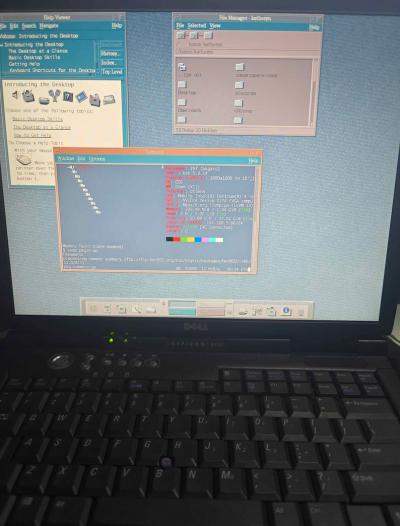
It's an amazing computer. It works great for 9x, 2000, FreeDOS, and even NetBSD. It's like it they were meant to be on this computer. Windows XP probably ran fine on this thing but definitely not when it was updated. This is one of the best 9x and 2000 laptops you can get! And NetBSD works well without much issues too.
Installation
If you want a working wireless card I'd recommend the Atheros AR5005G; the one I've had the most luck with is the WMIA-165G/E card that uses this chip. I am sure the Ralink RT2500 cards are good (they will definitely work better under 9x). If you've got an 802.11b card installed, definitely upgrade to an 802.11g card. For installation on this computer, use the latest NetBSD 11.0/i386 ISO image. Configure your hard disk with your desired partitions (I have about 2GB for swap and the rest for NetBSD). If you wanna dual-boot with 9x, 2000, and FreeDOS, I would recommend installing it to a free partition and then back up the MBR with BootICE to make it bootable in ntldr. Do a full installation from the CD, and then input your information. I like to have sshd, ntpd, and xdm enabled on my setup (XDM can be replaced with SLiM or dtlogin depending on the route you take).
After setup finishes and you go to restart your computer, you're met with the ctwm interface.
I would recommend enabling the following services in /etc/rc.conf: powerd, dbus, dtlogin (or slim), and rpcbind (you will need to install dbus. dtlogin for CDE, slim for lxde/other). powerd helps with power consumption and also allows for the system to go to sleep. Dbus is used for direct system controls from something like a desktop manager and pairs well with SLiM. SLiM is a more modern display manager that allows for elogind, polkit, and dbus to work together, and replaces XDM. DtLogin is for CDE exclusively and cannot be used on other environments. rpcbind may be necessary for some programs (mainly if you want to use CDE) so I like to have it enabled; set rpcbind_flags to "-l".
For a desktop environment or window manager, go with something lightweight and easy on resources. Xfce4 is a bit of an issue here, so go with something like LXDE or IceWM. You can also use CDE, but do be aware there are some bugs that need to be fixed. For a better display manager that can directly control power and sleep, use SLiM. SDDM is not functioning on NetBSD (at least on my end) and it takes up little to no resources. XDM is older software and may have issues with desktop environments, and does not natively support ConsoleKit, PolicyKit or dbus, which is needed for direct shutdown/restart/sleep commands.
Personally on my setup I went with CDE. I wanted something that was light and more vintage for the configuration as I felt like it would fit better. Do keep in mind screen lock never worked for me, disable it in settings.
Software support and usability
Let me get this straight first. This is a 24-year-old computer that performs poorly in today's standards so do not expect this to run modern Firefox very well. In fact, it runs rather badly due to acceleration issues. You can definitely daily drive this OS for sure, but just be aware that you're not gonna be able to do the same things you normally would on a modern system.
The packages I like to install first are sudo, nano, palemoon, basilisk, fastfetch, mplayer, vlc, yt-dlp, MesaLib, pulseaudio, pavucontrol, and libreoffice. Your setup will definitely vary, but NetBSD doesn't come with a lot of multimedia software at all. Pale Moon and Basilisk are UXP-based web browsers, fastfetch is like neofetch but actually maintained, and better. Pretty sure you know the rest if you've made it this far, but if you don't, google can help you. (I normally don't say this, but I'm certain if you're reading this you are well experienced with Linux/Unix-like/BSD systems.)
What this computer has running NetBSD over Linux is that the video drivers actually work. I never got the nouveau_vieux driver to work properly with Mesa versions past 21.3.9, because you literally CAN'T get them working. NetBSD provides the Mesa amber branch, which helps us a lot. You NEED MesaLib for this to work. You may need to copy nouveau_vieux_dri.so from /usr/pkg/lib/dri/ to /usr/X11R7/lib/dri/ (or wherever you get an issue saying nouveau_vieux_dri.so is missing). Getting the necessary DRI drivers is absolutely something you need to do.
The only thing I've had issues with is that if you leave the screen off for too long (several hours or more) the display will glitch up. I'm sure this is a Mesa/Xorg issue that I'm really not sure how to fix at all. Also the system will shut down instead of going to sleep for some reason. I will need to investigate this more.
Performance tweaks
A common misconception is that NetBSD uses "too much RAM". However, as a performance-first operating system it caches whatever programs are running into memory for faster loading. However, if you want to lower this by a slight amount, you can set some sysctl variables in /etc/sysctl.conf. Set vm.bufcache to 5, vm.filemax to 20, vm.filemin to 5, vm.execmin to 5, and vm.execmax to 15. These values adjust the amount of memory the system caches for files, buffering, and applications. Setting vm.anonmin to 70 and vm.anonmax to 95 will prioritize applications on physical memory and not the swap area.
For potentially better networking performance, set net.inet.tcp.init_win to 10 and net.inet.tcp.init_win_local to 10 as well. This will increase the amount of available pipelines for networking which may help. Do keep in mind for ethernet on this computer's hardware you're limited to 10/100 speeds and for NetBSD WiFi connections they usually only work on 802.11g.
You should also look into grabbing the system sources and configuring the kernel. This is detailed in Chapters 32-34 of the NetBSD handbook (if I'm not mistaken) and will go into detail on optimizing the kernel for your specific hardware. Additional compiler flags are discouraged and provide little performance improvement, as it will be much harder to debug an issue. Go through dmesg and disable the hardware not present in your system (and look where the devices are located). This will also help to lower memory usage and make your kernel more efficient. This is something I usually do on my NetBSD systems, but if you do a sysupgrade later down the road, switch to the generic kernel, update the sources, reconfigure the kernel, and compile.
Don't expect it to be super duper fast, especially since it's all running on 24-year-old hardware.
What now..?
If you've made it this far, congrats! NetBSD may not be the easiest operating system to set up, but it's a damn sight faster than a lot of the other options. Windows XP runs poorly on this laptop if you look at it funny, and Linux distributions have largely dropped 32-bit support and mesa amber support. You're dealing with a Pentium 4-M, and the majority of recent operating systems perform poorly on it. Luckily, you shouldn't have to look any further.
I've multi-booted my particular setup so I have separate partitions for NetBSD and I let it overwrite the MBR, so I can get it to load via NTLDR when I back it up with BootICE (which can be found on Hiren's Boot CD 15.2). Using NetBSD on this computer feels very refreshing and nice to have as a modern, currently maintained operating system that won't be going anywhere in the foreseeable future.
Hopefully you enjoyed reading this. If you need to contact me go to the about page and look under contacts. I am available to chat if you're having an issue.
