Giving justice to the most reviled Windows versions (except 11)
Originally written September 13th, 2026.
 Everyone is entitled to their own opinions. Please don't hurt me.
Where the hell do I start...
Windows is by far the most popular operating system aside from Android... unfortunately. However, there were times where it was a very solid choice and where it wasn't. Every version has had a rough history, maybe except 7. But some people had this hatred of certain versions stick around for years upon decades. It's time that I share my experiences on this extremely controversial subject.
To a lot of people there is a "good" and "bad" cycle of Windows, often skipping some other versions that are noteworthy. The most infamous examples of Windows flops were Windows Me, Vista, and 8. However, with tweaks and patches, these operating systems become more useful and even faster than their well-beloved counterparts. I used to go around the internet at age 10 telling people "oh vista wasn't THAT bad!!" and naturally the response was mostly negative. Nowadays a good amount of people actually know this, but that can't be said for something like Windows Me, or to some degree, Windows 8.x.
People will commonly regard Windows XP and Windows 7 to be the greatest versions of Windows to exist. However, they don't come without their flaws. XP was a resource hog especially when it came out compared to 98/Me, NT4, and 2000. The user interface of Windows XP looked more like a Fisher-Price toy, or as I call it, a "rejected Teletubbies prop". It was a far cry even from the pre-release Whistler builds that had the more professional and modern Watercolor interface, which unfortunately never made it into the final release. Hell, I think even a more polished version of the Sample Test Visual Style would've looked better. The Silver Luna theme does look pretty nice but ultimately I prefer Royale or Watercolor when using XP.
Now we will start discussing the most hated version of Windows...
Windows Me "Misunderstood Edition"
If you bring this version of Windows up to anyone who owned a computer in the year 2000, bought a new one at that point, or anyone working in IT at the time... you will be met with pure hatred and vietnam flashbacks of the system crashing and refusing to work. While this was true when the OS first came out, many years later it would redeem itself as a solid option.
"It is neither fast, nor stable. It also has serious security, compatibility, and user-friendliness problems."
"It works good, it just requires a certain touch......" "...With a sledge hammer."
"As a Beta Tester for WindowsME, I can honestly say that's it's NOT worth it."
"No DOS?! It's a disgrace! I demand DOS!"
"I have used ME for a while and I am about ready to pop the CD in my microwave."
"We encountered GPFs, BSODs, out of resources (GDI) errors, driver problems and you name it.
"Don't you think that Windows Me is probably just Mr. Gates searching for his inner child that is terribly fucked up?"
What you just read are excerpts from real people talking on forums in the early 2000s about what they deemed to be a downgrade over 98SE. You might think, "Katheryn, you're fucking delusional." Just, hear me out for a moment...
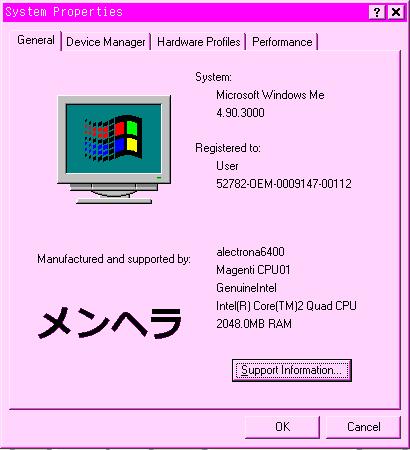
I normally installed 98SE often if I ever worked with a 9x-based operating system. That changed in 2024 when I gave Windows Me a second chance, and honestly... it's a lot better than you would think. Contrary to what other people have said, hardware support is actually slightly better than in 98SE. And with the right patches, you'll have an experience that is as good as, if not better than Windows 98SE. My go-to tweaks are to disable StateMgr and PCHealth in msconfig's startup section. Those two services are responsible for 95% of issues in Windows Me. Next you will need to install the 9x Component Update Package, also available on my website under files and other uploads. After that you will install the Unofficial Windows Me Cumulative Update v1.05, which is located near the 9XCUP. After that, you will need to install the TPC-WinMe-DOSMode package that is present in the 9x_Me folder as well.
What you will be left with is a fully-patched, more stable, and more functional Windows Me installation. The DOS mode being restored also fixes a lot of issues that were caused by its removal. While it's not 100% perfect, it is perfectly fine for whatever you'll probably be doing on 9x these days. Windows Me also has a few advantages already, such as native USB Mass Storage support (something 98SE always struggled with), more recent optimizations to the 9x kernel, and better support for newer systems. Where Windows 98SE would sometimes struggle, Me could do it better. While this doesn't make Windows Me as stable as NT because it is still 9x, it makes it so much more usable. And a lot of the issues people had with Windows Me were already happening in other 9x versions.
With the elephant out of the room, we can move on to...
Windows Vista, a beauty queen who was outcasted
Let's all be honest, Nothing can possibly top Windows Vista in the looks department. NOTHING. It is the most artistic, visually-appealing, and beautiful version of Windows to date. Windows 7 is a runner-up.
However, throughout development and even at launch, these looks would come at a cost; system resources were less efficient at handling Vista and its new UI. Computers sold in the early-2000s up until early 2008 had issues running Vista, due to its higher demands. It was power-hungry, and ran worse than its predecessor... at the time. Vista and the development hell that was the Longhorn project was the only reason XP got so popular. It stuck around for a whole 5 years until being replaced. However, comparing Windows Vista to Windows XP is very difficult. Both versions were radically different from each other, and they had their pros and cons. Windows Vista was also shipped on hardware at launch that would even struggle running XP, which led to a lot of criticism around it. It was not until late 2007/early 2008 where computer processors would get much faster and more stable Vista machines would be possible. However, this criticism is very much understandable, given the earliest versions of Windows Vista were plagued with bugs and optimization issues. However, Windows Vista was the first major renovation to the Windows NT kernel since it was first conceived... but that didn't stop the issues entirely.
"It was slow and caused things to crash, so we spent $100 to downgrade to XP."
"I really hate vista with a passion. XP ftw!"
"Used it 4 months, now i'm back to XP and very happy. Nice interface, but too damn buggy."
"VISTA: Virus, Intrusion, Spyware, Trojan, Ad-ware"
"Windows Vista... disgusting."
"Dude, do not ever touch Vista. Ever. Don't. Get Windows 7."
Again, I understand the frustrations people had with Me and Vista. At launch, it was just bad. But people never gave these a second chance with patches and updates, which, shockingly fixed the issues instead of most instances of Windows updates adding more bloat and causing more problems (Windows XP is a textbook example of this). What you just read were more posts from forums at the time, and shortly after the release of Windows 7. The 5th quote actually came from someone I overheard when I was at VCF Southwest in 2026 when they were rummaging through the free pile. He probably LOVES Windows XP. /j
If you want the best possible experience with Windows Vista, find ISOs that have all the latest updates slipstreamed as even throughout its lifespan, Windows Vista got various updates to fix compatibility and stability issues. Windows Vista also received 2 Service Packs, Service Pack 1 refining the OS entirely and Service Pack 2 giving it so much more polish and optimization. You will notice an immediate difference in performance and reliability with Windows Vista Service Pack 1 installed, and it gets so much better with Service Pack 2. Windows Vista wasn't well received, which also means the updates it got were fixing more issues and security flaws while also refining the OS even more. Windows XP was an interesting case where it had those updates for a couple years, then Service Pack 2 came out and added much more to the OS. Later updates made older computers much slower and less stable. Ask me how I know.
My personal go-to is to use an updated Vista ISO with all updates up to 2017 and all Server 2008 updates to January 2026, and it provides for an excellent experience. Recent discoveries were also made to help fix long-standing issues with Vista x64 on modern hardware such as the infamous "drift bug" you would see on Ryzen and on anything newer than 3rd gen Intel Core i-series chips. Windows Vista also has a tendency to run even better than 7 due to it using a more optimized DWM and supporting more older hardware than 7. Compatibility may not be great, but recent achievements have been made to run modern web browsers and a new compatibility layer called Second System is available for Vista (and even 7-11 23H2) on win32's patreon. To disable UAC and security center, first disable UAC in the control panel, set Security Center to not notify your computer, and disable Security Center in services, in that order. Windows Vista also was the last operating system to retain a lot of elements from pre-XP windows versions such as the classic start menu and cursors that have existed as far back as Windows NT 3.1. SSD optimizations were added to Windows 7 so there are some tweaks for older versions you'll need to use to get Vista to play nicer on SSDs. But who needs SSDs when you have ReadyBoost?
Now, to the least interesting part of this whole thing.
Windows 8: "Touching is... not great."
One thing you will immediately notice when you compare Vista and 7 to Windows 8 is how much more dull it looks. Everything uses a flat design aesthetic adopted from Windows Phone 7, even the user interface is almost like the one in Windows Phone 7! Yeah, honestly, Metro is something I genuinely hate. I could definitely understand why people hated Windows 8, especially with that god-awful start screen.
Some delinquent at Microsoft decided that an interface designed for tablets should be on a desktop or laptop computer. That decision backfired so badly to the point where Windows 10 got rid of the start screen completely. However, underneath all that Metro UI crap was an operating system that performed much better than even Windows XP did. Windows 8 and 8.1 are absolute speed demons in performance, it is clear they optimized the OS for the onslaught of eMMC slop that would roll out around the same time.
I really don't have much to say about this one. I never really mess with 8.x that much anymore, but the answer is as simple as a hop, skip, and an install Explorer7 or Open Shell away. Windows 7 and 8.1 were subject to telemetry-inducing updates which caused performance issues, but 8.1 survived it the most. While Windows 7 was nearing its demise, Windows 8 and 8.1 were still running happily across the prairies. Of course, people often remove these updates from more recent ISOs and even exclude them from update packages. The updates to Windows 8.x didn't do too much, they added more features in moderation and they fixed security flaws and bugs. Even a computer with the minimum requirements on Windows 8.x ran pretty well, that's something you can't say about XP, Vista, or 7. I've used 8.x on several computers over the years and I found it to be very fast on computers even with a mechanical hard drive. Definitely not something you can say about its successors!!
The """greatest""" versions of Windows to exist
Windows 95, Windows 98SE, Windows XP, and Windows 7. The three horsemen of what people deem to be the greatest versions of Windows to ever exist. Only two of these were mostly well-received at launch by a wide variety of people. Can you guess which ones?
They're Windows 98SE and Windows 7. XP is a runner-up, but it had a polarizing amount of criticism when it came out as well. Windows 95 was a technological revolution for its time, but would start to push the limits of a DOS-based Windows environment. Windows 98SE and Windows 7 were more polished releases to existing versions (Windows 7 being an entirely new version). But what does Windows XP, 7, and 10 have in common? Updates actually made them run worse.
There is a rather obscure thing where a commerically successful product will start to get worse over time, and where a commercial failure got better over time. The biggest examples in Windows are the WGA Validation Tool in XP, Windows XP Service Packs 2 and 3, Windows 7's various updates that added telemetry and slowed your computer down, the "Get Windows 10" upgrade tool (which may not entirely count), The Microsoft Edge update in Windows 7 and 8.1, and those pesky EoL notifications you'd get. The other side is where things get interesting. Windows Me and Vista would receive the usual feature updates, but they never got anything that bloated the OS more than it would have. Microsoft was actively pushing people to buy new computers before it was cool.
I remember people dealing with the issues in Windows 7 and 10 with these updates, and I know how badly the WGA Validation screwed over copies of XP. In my nearly 12 years of working on computers, I have witnessed the downfall of what were once great operating systems. Windows XP is an interesting example; I don't necessarily like it anymore. I thought it ran fine on older computers until I actually went through some older machines when I was 14 or 15, and found it utterly slow compared to the GOAT, Windows 2000. There are also several people who have documented their experiences with "windows rot" which largely began its course on XP, where the computer would get slower the more you used it, until it took 5-10 minutes for it to boot. This could be fixed by removing programs from your computer and defragmenting your hard drive (DON'T DEFRAG AN SSD!!). I've seen this happen on 9x as well but it's very uncommon. I have worked on hundreds of computers over the years and the most common thing I see is how slow Windows gets with all its use. This could be a sign of a dying hard drive, but I've seen it on perfectly healthy drives too.
Story time... the first computer I used was a Compaq Presario 7000T running Windows 98SE, later upgraded to XP Home edition. I couldn't even load Internet Explorer. It had an 866MHz Pentium III processor, 384MB of RAM, a 30GB hard drive, a Riva TNT2 M64, and honestly that sounds like a solid 98SE computer. It's when you give it XP where it starts having... Xtra Problems.
Conclusion
I'm probably gonna regret writing this, with all the slander towards XP especially. Your experience will vary, but I've had so many different machines so I have a wide variety of use cases to go off of. Whether it was someone's personal computer, a business/work machine, a school computer, or something used for industrial work... it's all gonna be different. You are entitled to your own opinions, I am not judging anyone for their preferences, I am merely sharing my own. And teasing you a little, probably. Girls tease a lot, and it's nothing to be scared of.~ *giggles cutely*
Don't get me wrong, I do like some things about Windows XP and 7, just not everything. I prefer the look of the beta versions of XP, and I prefer a less bloated experience on Windows 7. The moral of the story is, don't be afraid to try something new to you, but be aware that there are people that can help you. Sometimes the most obvious choice may not be the best, and that's okay. I take pride in helping people out and being a good resource.
Hopefully you enjoyed reading this. If you need to contact me go to the about page and look under contacts. I am available to chat if you wanna share your own experiences or if you just wanna talk (nicely, of course).
