NetBSD on the HP Pavilion zd8000
Originally written September 13th, 2026.
 This also applies to the HP Compaq nx9600 and Compaq Presario X6000, as they use the same motherboards.
Before you begin/"Why NetBSD?"
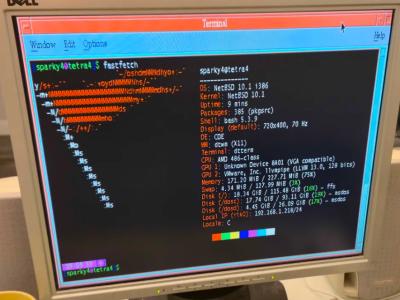
It's a well-known fact that NetBSD is an operating system that can run on just about anything. From the Macintosh IIx and the 68030 Amigas to anything from the past few years, it's known for being lightweight, performant, and very portable (in a sense that it runs on like, a million different architectures). However it gains less attention than other UNIX-like operating systems like a (GNU+)Linux distribution or FreeBSD. What NetBSD has that a lot of other systems don't have is the fact that it still runs on vintage hardware. I know a lover of mine who has a 486 running it, and I've seen people run it on various 32-bit 68k and pretty much all PowerPC Macintosh hardware. It has a healthy amount of community support and it'll be here for years to come.
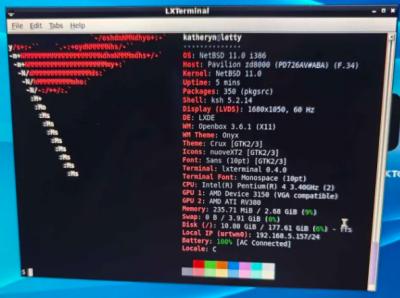
That being said, NetBSD is an amazing choice if you have an older computer (like late 90s and early 2000s x86 hardware, or an old PowerPC Mac). In this writeup I will be talking about running NetBSD 11.0/i386 on the HP Pavilion zd8000, a rather infamous and somewhat legendary desktop replacement from 2004.
The hardware in question
This particular HP Pavilion zd8000 is well maxed-out. It has the ATI Mobility Radeon X600 with 256MB of VRAM, 2.75GB of addressable RAM (thanks to a BIOS mod), a 500GB M.2 SATA SSD converted to 44-pin IDE, a 1680x1050 "BrightView" LCD panel, and the heart of the system-- a 3.4GHz Intel Pentium 4 HT 650. I wish we could do better, honestly.
Initially there are some things that wouldn't work. The internal WiFi card from Broadcom had to go, and I replaced it with an AR5008X Atheros card from an old AirPort Extreme router. However, NetBSD has rather poor support for the athn driver so I ended up using a TP-Link TL-WN725N USB dongle that fits neatly on the back of the computer for WiFi (this dongle uses the urtwn driver which is much better). I keep the Atheros card for Windows XP and Vista on this computer and I use the TP-Link as a failsafe or just for NetBSD. The internal ethernet uses the rtk driver which is very mature and works just fine, this computer uses the RTL8100CL (which is based on the RTL8139) which is a very well-supported chipset. If you are interested in expanding the RAM limit on the zd8000 and removing the whitelist, I will have custom BIOS files available to download. These require Windows or a DOS environment to flash. Will add details on my dedicated zd8000 page.
Installation
If you want a working wireless card I'd recommend the TL-WN725N I mentioned earlier, you can easily find it on Amazon for $10. For installation on this computer, use the latest NetBSD 11.0/i386 ISO image. Configure your hard disk with your desired partitions (I have about 4GB for swap and the rest for NetBSD). Do a full installation from the CD, and then input your information. I like to have sshd, ntpd, and xdm enabled on my setup (XDM is only for temporary use if you want to use SLiM).
After setup finishes and you go to restart your computer, you may run into a "heap full" error. To fix this, go to the boot prompt and type "boot hd0a:netbsd" then press enter. Get root access once you log in and edit /boot.cfg and remove any mentions of "rndseed". This was fixed in 11.0/i386 but remains broken in 11.0/amd64. This may not happen on your computer but I had this issue on mine.
I would recommend enabling the following services in /etc/rc.conf: powerd, dbus, slim, and rpcbind (you will need to install dbus and slim). powerd helps with power consumption and also allows for the system to go to sleep. Dbus is used for direct system controls from something like a desktop manager and pairs well with SLiM (more on that in just a bit). SLiM is a more modern display manager that allows for elogind, polkit, and dbus to work together, and replaces XDM. rpcbind may be necessary for some programs (mainly if you want to use CDE) so I like to have it enabled; set the rpcbind flags to "-l".
For a desktop environment or window manager, go with something lightweight and easy on resources. Xfce4 is a bit of an issue here, so go with something like LXDE or IceWM. You can also use CDE, but do be aware there are some bugs that need to be fixed. For a better display manager that can directly control power and sleep, use SLiM. SDDM is not functioning on NetBSD (at least on my end) and it takes up little to no resources. XDM is older software and may have issues with desktop environments, and does not natively support ConsoleKit, PolicyKit or dbus, which is needed for direct shutdown/restart/sleep commands.
Software support and usability
Let me get this straight first. This is a 22-year-old computer that performs like a Pentium 4 desktop (because it literally IS one, just in laptop form) so do not expect this to run modern Firefox very well. In fact, it runs rather badly due to acceleration issues. You can definitely daily drive this OS for sure, but just be aware that you're not gonna be able to do the same things you normally would on a modern system.
The packages I like to install first are sudo, nano, palemoon, basilisk, fastfetch, mplayer, vlc, yt-dlp, MesaLib, pulseaudio, pavucontrol, and libreoffice. Your setup will definitely vary, but NetBSD doesn't come with a lot of multimedia software at all. Pale Moon and Basilisk are UXP-based web browsers, fastfetch is like neofetch but actually maintained, and better. Pretty sure you know the rest if you've made it this far, but if you don't, google can help you. (I normally don't say this, but I'm certain if you're reading this you are well experienced with Linux/Unix-like/BSD systems.)
What this computer has running NetBSD over Linux is that the video drivers actually work. I never got the r300 driver to work properly with Mesa versions past 21.3.9, and NetBSD uses Mesa 21.3.9 which also contains drivers for much older hardware as well (like the r200 and nouveau_vieux drivers that work on the Radeon 7500 up to the 9000/9200, and the Celsius/Kelvin nVidia cards respectively). That's what MesaLib is for, it installs the DRI drivers needed and it installs necessary 3D libraries. I also got video acceleration to be rather decent on the GeForce4 Go 440 in my Inspiron 8200. On more recent Linux distributions, it just kept using the llvmpipe driver on the zd8000. This led to rather miserable acceleration and 3D performance. Getting the necessary DRI drivers is absolutely something you need to do.
Performance tweaks
A common misconception is that NetBSD uses "too much RAM". However, as a performance-first operating system it caches whatever programs are running into memory for faster loading. However, if you want to lower this by a slight amount, you can set some sysctl variables in /etc/sysctl.conf. Set vm.bufcache to 5, vm.filemax to 20, vm.filemin to 5, vm.execmin to 5, and vm.execmax to 15. These values adjust the amount of memory the system caches for files, buffering, and applications. Setting vm.anonmin to 70 and vm.anonmax to 95 will prioritize applications on physical memory and not the swap area.
For potentially better networking performance, set net.inet.tcp.init_win to 10 and net.inet.tcp.init_win_local to 10 as well. This will increase the amount of available pipelines for networking which may help. Do keep in mind for ethernet on this computer's hardware you're limited to 10/100 speeds and for NetBSD WiFi connections they usually only work on 802.11g.
You should also look into grabbing the system sources and configuring the kernel. This is detailed in Chapters 32-34 of the NetBSD handbook (if I'm not mistaken) and will go into detail on optimizing the kernel for your specific hardware. Additional compiler flags are discouraged and provide little performance improvement, as it will be much harder to debug an issue. Go through dmesg and disable the hardware not present in your system (and look where the devices are located). This will also help to lower memory usage and make your kernel more efficient. This is something I usually do on my NetBSD systems, but if you do a sysupgrade later down the road, switch to the generic kernel, update the sources, reconfigure the kernel, and compile.
This also isn't necessarily a performance tweak, but you should also configure the lid switch powerd script to put the computer to sleep when you close the lid. Do keep in mind the video may look glitched out when you open it back up, but DON'T PANIC! Your computer is fine, just do Ctrl+Alt+F1 and then Ctrl+Alt+F5. This switches between different tty's on the computer and will refresh the display.
What now..?
If you've made it this far, congrats! NetBSD may not be the easiest operating system to set up, but it's a damn sight faster than a lot of the other options. Windows XP is good for older software, but not great for internet connectivity and modern software. Linux is rather bloated these days, and even a lighter distro like AntiX will have issues with the video acceleration. Windows 2000 is a solid option, but lacks proper support for hyper-threading which can cause some performance issues. OpenBSD and older versions of FreeBSD will also work but I've found NetBSD to be a better option between them all. FreeBSD is geared more towards modern support, OpenBSD is very lenient on security and may not perform well, and NetBSD is performance-centric all around. It's a really fast operating system, and it's hard to turn it down as an option for an older computer.
I've multi-booted my particular setup so I have separate partitions for NetBSD and I let it overwrite the MBR, so I can get it to load via NTLDR when I back it up with BootICE (which can be found on Hiren's Boot CD 15.2). There are a few issues but these are related to old drivers (like athn timing out) and some weird quirks with ACPI (especially with this computer using a more proprietary BIOS). They are usually solved by using some different hardware in the system and do not impact usability. Aside from that, using NetBSD on this computer feels very refreshing and nice to have as a modern, currently maintained operating system that won't be going anywhere in the foreseeable future.
Hopefully you enjoyed reading this. If you need to contact me go to the about page and look under contacts. I am available to chat if you're having an issue.
