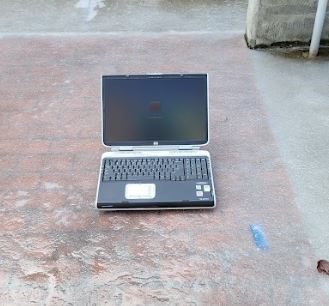
HP Pavilion zd8000
(also applies to the HP Compaq nx9600 and Compaq Presario X6000)
Summary
The HP Pavilion zd8000 (also sold as the HP Compaq nx9600 and Compaq Presario X6000) is a 17-inch "Desktop Replacement" laptop computer that is notable for being one of the few """"laptops"""" equipped with an LGA775 socket. Introduced in Late 2004, these did not sell well for... obvious reasons, and ended up being HP's last laptop with a desktop processor, or anything remotely close with a TDP rivaling desktops. Sales mainly stopped around 2006 but production was halted in 2007. Compared to the zd7000, this did bring improvements in cooling (not so much for original 1MB Prescott CPUs), and accomodated for the high-power components better than its predecessor.
System Specifications
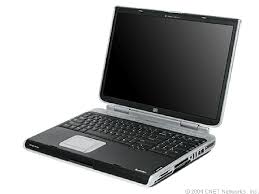 Processors:
-Intel Pentium 4 5xx(J) "Prescott", LGA775
-Intel Pentium 4 6x0 "Prescott-2M", LGA775
-(Unofficial) Intel Celeron D "Prescott", LGA775
Note: Cedar Mill Pentium 4s are (unfortunately) not supported, as are Pentium Ds.
-17.3" CCFL-backlit LCD Display, with a resolution of 1440x900 or 1680x1050.
-ATi Mobility Radeon X300 with 64MB of VRAM, or...
-ATi Mobility Radeon X600 with either 128MB or 256MB of VRAM
-2 DDR2 SO-DIMM slots, supporting up to 2.5GB of RAM at PC2-4200 spec.
With a modified BIOS, some computers can boot with 3GB of RAM. 128MB models can take up to 2.87GB and 256MB models can take up to 2.75GB.
-2.5" Parallel ATA/100 Hard Disk Drive
There are unused pads for a SATA port on the motherboard, but the computer does not have the necessary BIOS or hardware to enumerate any device plugged in.
-DVD-ROM, or DVD-/+RW laptop IDE optical drive
-Conexant AC97 Audio chipset
-Realtek RTL8139 10/100 Ethernet
-Broadcom 802.11b/g WiFi
-56K V.92 Modem
-4 USB 2.0 ports
-Composite/SVideo/Component TV-out multi-port
A special adapter (HP P/N 417149-001) is required to use Composite or Component, and recommended for S-Video.
-VGA monitor output
-FireWire 400/IEEE 1394 port (4-pin)
-Audio in/out jacks
-RJ11 Modem Jack
-RJ45 Ethernet Jack
-"HP USB Digital Drive" slot
-PCMCIA/Cardbus slot
-"Expansion Port 2" port
-ExpressCard/54 slot
-Microsoft Windows 2000, XP, Vista, 7, 8.x 32-bit
Windows 98/Me will work but only in APM mode, and as of now I haven't figured out video drivers.
-FreeDOS or SvarDOS
-NetBSD, OpenBSD, FreeBSD (before 15.0)
-Various 32-bit x86 GNU+Linux distributions, such as AntiX or Void
Mesa versions after 21.3.9 have issues with the Radeon X300 and X600. It is recommended to use NetBSD/i386.
It is also possible to install 64-bit operating systems if the computer's CPU is supported, but not recommended due to performance issues.
-6600mAh DP390A HP battery
A lot of these batteries usually die; good luck finding a working one. Also aftermarket batteries usually work better.
-HP DR911A 180W 4-pin proprietary charger (NOT A BARREL JACK! It looks similar to a USB port but its rounded).
-ML1220 CMOS battery
Known Issues
The HP Pavilion zd8000's have several issues that may need to be fixed. The system is prone to overheating and needs proper maintenance as the fans are almost always on. Dust them out every now and then, and redo thermal paste with more performant material. Don't forget to replace the thermal pads too! I would highly recommend replacing a first-generation Prescott with the Intel Pentium 4 650 (Prescott-2M). It has a lower TDP yet it does not compromise on performance. Unfortunately these computers do not take Core 2 CPUs or Cedar Mill Pentium 4's.
The LCDs have a tendency to be made by LG/Philips and are known for an issue where vertical lines can pop up out of nowhere. This is NOT the video card failing, this is just the LCD screen dying. Find a compatible replacement.
The batteries in these have likely failed or are about to fail. I managed to stitch together a battery with a different aftermarket BMS board and the proper cell arrangement. If you're re-celling an OEM battery you may need to keep the BMS powered to prevent hard-bricking your battery. Now the batteries don't necessarily mean you can use this portably, it is strongly recommended to only use it for suspend mode or if you're taking the computer somewhere. Always pack a power adapter with you!
My thoughts
The HP Pavilion zd8000, and any machine that's based on it are considered somewhat legendary and rather obscure machines in HP's history. It is one of the few laptops using the LGA775 socket as mentioned earlier, and as such it comes at a cost: higher maintenance intervals.
These machines pop up on eBay every now and then and aren't too uncommon. However, the Presario X6000 variant is extremely rare. Please don't scalp these things, I beg of you!
It's a damn nice machine if you want a Windows XP gaming laptop, or if you're looking for a more exotic machine. It's the best Pentium 4 desktop replacement aside from the elusive Clevo D900T, which is even rarer than the X6000. Have fun with yours and try to put it to good use!
...Just make sure you don't cook it.